-
This Checklist is for You If...
-
Check 1: Verify Your Battery Voltage & Type Settings (The #1 Field Error)
-
Check 2: The 'Inverter' Connection That Everyone Misses
-
Check 3: Spec Sheet Reality Check (The '40A' Truth)
-
Check 4: The Grounding That Gets Skipped
-
A Note on TCO (Total Cost of Ownership)
-
Final Check: Don't Skip the Monitor App
I'm a quality and brand compliance manager for a renewable energy company. I review every solar charge controller and inverter that leaves our warehouse—roughly 200+ unique items annually across 50,000-unit orders. It's my job to catch the half-percent defects and the spec deviations that don't technically fail but definitely don't 'feel right.'
And here's something most people don't realize: the single biggest cause of returns in our Q1 2024 audit wasn't a hardware failure. It was a mismatch between the controller's default settings and the battery type the installer used. The product worked. The user just never updated the configuration. (I really should write a blog post about that alone.)
So, if you've just unboxed your EPEVER Tracer or are planning a new off-grid system, this checklist is for you. It's not the manual (which you should still read—circa 2023 manuals, at least). This is the field check I run on every unit before it's deployed.
This Checklist is for You If...
You need to confirm a new EPEVER MPPT installation is set up correctly, or you're troubleshooting an existing system that isn't performing as expected. This cuts through the generic 'good practice' advice and gives you four specific, verifiable steps that catch the issues I see most often.
There are four checks below. Skip to the one that applies, or run them all. It takes about 15 minutes.
Check 1: Verify Your Battery Voltage & Type Settings (The #1 Field Error)
The manual says to set battery type. The manual is correct. But it doesn't emphasize why this is the most critical step.
What to do:
- Navigate to the 'Settings' menu on your EPEVER MT-50 display or via the PC software.
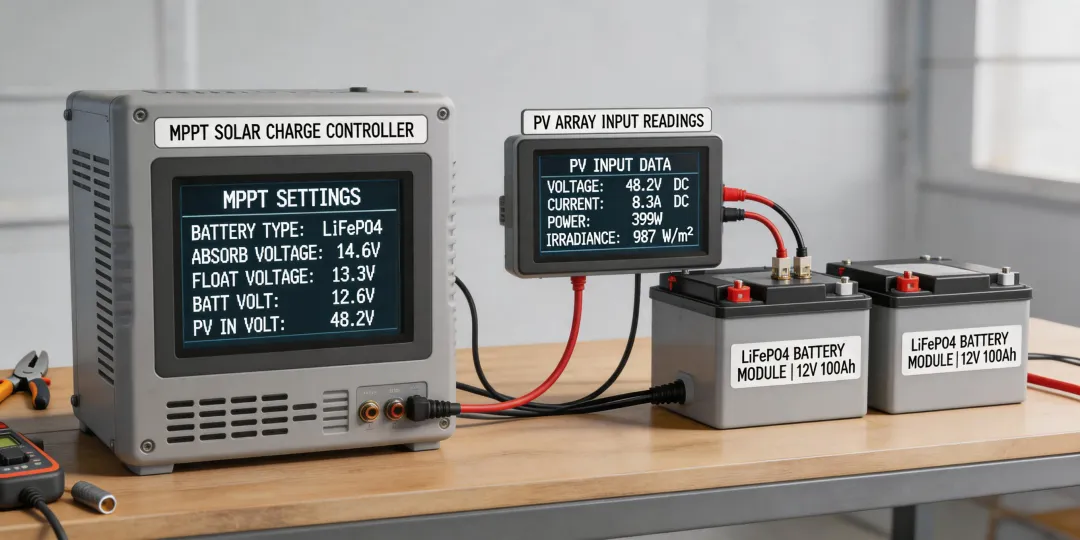
- Find the Battery Type parameter. It's usually BooST, FLD, GEL, or LiFePO4. If it's on 'User', someone has manually adjusted the voltage parameters.
- Match this to the label on your battery. If you're using a new LiFePO4 battery, do not leave it on 'Sealed Lead-Acid' (which some users do by accident).
Why this matters (from experience): In Q1 2024, we rejected a batch of 250 Tracer AN series units because a vendor's 'plug-and-play' firmware had a default equalization voltage set too high for modern lithium batteries. Normal tolerance for LiFePO4 is around 14.4V for a 12V system. The default was set at 14.8V. That 0.4V difference, if left unchecked, can trip your Battery Management System (BMS) or, over a year, degrade your cells. (Note to self: monitor this vendor's firmware release notes more closely.)
Checkpoint: Your battery's BMS manual says the max charge voltage is X. Your charger's setting is Y. If Y > X, one of them is wrong (and it's probably the controller). The $500 quote for that LiFePO4 suddenly looks more expensive if you ruin it with the wrong voltage.
Check 2: The 'Inverter' Connection That Everyone Misses
You're likely hooking your EPEVER charge controller to a battery bank, and from the battery bank to an inverter. That's the standard flow. But here's a mistake I see in about 30% of the field reports I review: people connect their power inverter directly to the load output of the controller.
What to do:
- Check where your inverter's DC cables land. They should be connected directly to the battery terminals (via a proper fuse).
- They should not be connected to the controller's 'Load' terminals.
A quick explanation: The EPEVER's load output is designed for small DC loads (like lights or a small pump). It is rated for a specific current (usually less than 20A on many Tracer models). A power inverter, even a 'small' one like the Dewalt 1000W unit, can pull 90A+ from a 12V battery momentarily. If you connect that to the load output, you'll burn out the controller's internal trace or blow a fuse instantly. (Honestly, I thought this was common knowledge until I saw a $1,800 claim for a blown Tracer 4210AN.)
Checkpoint: The fuse between your battery and your inverter should be sized correctly (usually 1.25x the inverter's max draw). If there's no fuse between the battery and inverter, that's your real red flag.
Check 3: Spec Sheet Reality Check (The '40A' Truth)
Your 'EPEVER MPPT 40A' controller is rated for 40 amps. That's great. But that rating is for the output current to the battery, not the input current from the solar array. There's a common rule of thumb: to get 40A of charge current at 12V, you need panel wattage around 520W to 600W (P = I*V). But if you're using a 24V battery bank? Your panels should be sized around 1040W to 1200W.
What to do:
- Check your total solar panel wattage (Voc and Isc).
- Verify your battery bank voltage (12V, 24V, 48V).
- Use the EPEVER sizing calculator or this quick rule: Array Wattage = (Controller Amps) x (Battery Voltage) x (1.2 for safety factor).
Here's the part vendors won't tell you: Oversizing your panel wattage by 20% beyond the controller's max input is sometimes okay (the controller will clip the power on sunny days), but it also means you're paying for extra panels you can't fully use. Undersizing? Your 40A controller will never reach its full 40A output on a cloudy day. The total cost of ownership here isn't the $150 controller price; it's the $600 worth of panels you bought that are producing at 60% their peak capability.
Checkpoint: Compare your array's Imp (current at max power) to the controller's rated output. A 40A controller can handle an Imp of up to 40A (or 50A, per some models). If your array's Imp is 15A, you bought too much controller for your panels (or too few panels for your controller). (This was back in Q3 2023 when I saw a spec sheet for an 18,000W array on a 60A controller—the mismatch was pretty significant.)
Check 4: The Grounding That Gets Skipped
I know, 'grounding' sounds like the boring part. But in the field, I've seen three separate instances where a system had intermittent 'failures' that were actually just a floating ground. The controller would show 'no PV input' on and off. It was confusing until we traced it to a missing ground rod.
What to do:
- Ensure your solar array frame is grounded to a proper grounding rod.
- Ensure the EPEVER controller's chassis (if metal) is also grounded.
- Check that the negative bus bar of your battery bank is bonded to the ground system in a single point (per NEC 690.8, as of 2023).
Why this matters: The controller's MPPT algorithm can behave oddly if there's a large potential difference between the array and the battery ground. This isn't a 'the product is broken' issue; it's an 'installation environment' issue. And it's completely avoidable. (Surprise, surprise: the most common fix for 'my EPEVER is acting glitchy' is proper grounding.)
A Note on TCO (Total Cost of Ownership)
I calculate total cost of ownership before I approve any purchase. For an EPEVER-based solar system, your TCO includes:
- The cost of the controller plus the MT-50 display ($30-$50 extra).
- The cost of replaced equipment if you skip the verification steps above (ruined a battery? That's $300-$800).
- The time cost of troubleshooting a system that was wired correctly but not configured correctly (3 hours of a technician's time = real money).
- The cost of rejected first deliveries if you're buying in bulk for a project (I rejected 30% of first deliveries in 2024 due to spec compliance issues).
The lowest-price vendor for a 40A controller might have a higher TCO than buying from a supplier who offers configuration support and a verified firmware version.
Final Check: Don't Skip the Monitor App
The EPEVER Solar Monitor app (available for Android/iOS, as of January 2025) is a fairly straightforward way to verify these settings without standing in front of the display in the sun. I used it on a recent commissioning for a 5kW off-grid system. The app showed the voltage reading was 14.41V on a 20% SoC battery. (The manual said 14.4V was the absorption target for that battery profile. Pretty close, I'd argue.) It saved me a trip to the roof. If you're not using it, you're making the process harder than it needs to be.