-
What is BESS? And why should a non-engineer care?
-
Epever MPPT Solar Charge Controller: Why we went with EPEVER?
-
What makes the Epever Tracer 4210AN 40A different from cheaper PWM controllers?
-
Inverter vs. Battery Backup: Which one do we need for outages?
-
Solar Generator vs. Power Bank: Which is better for outages?
-
Our 2025 lesson: Don’t oversize, but don’t undersize the inverter
What is BESS? And why should a non-engineer care?
When I first saw the term “Battery Energy Storage System” — BESS — on a vendor quote, I thought it was just a fancy name for a big battery bank. Turns out that’s not wrong, but it’s incomplete.
A BESS is the entire package: the battery cells (like LiFePO4), the management system (BMS), the inverter, and the housing. It’s what allows you to store solar power and use it when the grid isn’t stable, or at night. For us, that means our work-from-home employees don’t lose productivity every time a thunderstorm hits.
Not all BESS are created equal. A cheap one might not have proper thermal management. I learned that the hard way after a vendor’s “bargain” unit shut down in 2022 summer heat.
Short version: BESS is the whole system. It's more than a battery. It's a smart box that decides when to store, when to release, and how to keep your stuff safe.
Epever MPPT Solar Charge Controller: Why we went with EPEVER?
In early 2024, we were upgrading our emergency backup system for a site with 8 workstations. We needed a controller that could handle a 24V battery bank and top it off efficiently.
I’d heard of brands like Victron and Morningstar — top-notch, but priced like it. Then I stumbled onto Epever’s MPPT series. Honestly, I assumed “budget-friendly” meant “cheap internals that break.” That was a misjudgment.
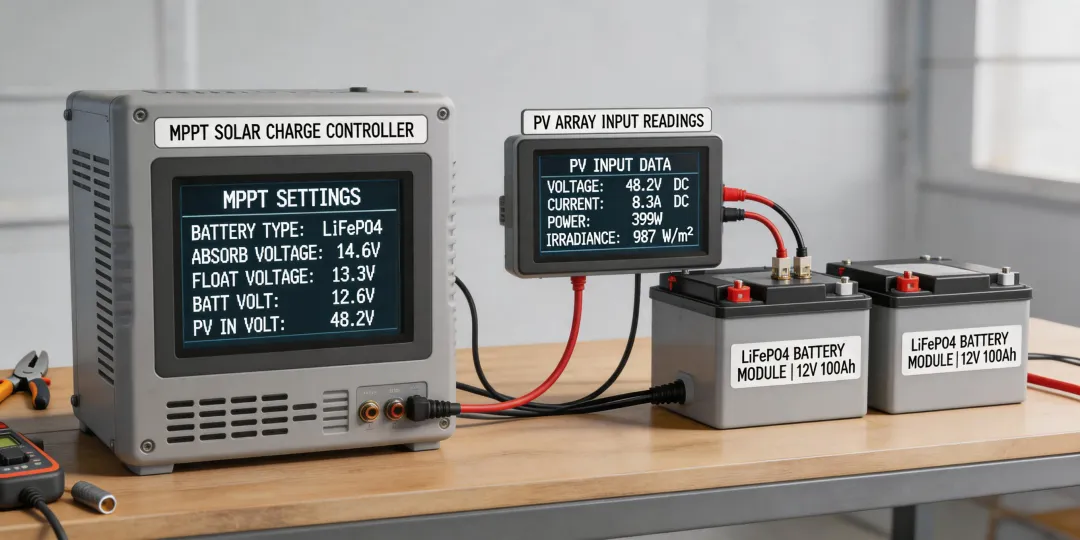
What Epever does well (circa 2024) is MPPT efficiency for the price. Their Tracer AN series, for example, uses Maximum Power Point Tracking to extract more energy from the panels. The Tracer 4210AN (the 40A model we bought) has been running 15 months without a hiccup.
Not ideal for a massive solar farm, but perfect for our small office setup. Professional MPPT technology at a price that didn’t require a special budget approval from finance.
What makes the Epever Tracer 4210AN 40A different from cheaper PWM controllers?
When I started, I figured all charge controllers did the same thing: connect solar panels to batteries. Wrong. Here’s the beginner mistake I made.
I bought a PWM controller first — $35 off Amazon (this was back in 2020). It worked fine for a week. Then a cloudy day hit, and my battery bank stayed half-charged. The PWM controller couldn’t adapt to less sunlight; it just passed through voltage without converting it.
The Epever Tracer 4210AN uses MPPT tech. That means it’s constantly adjusting to find the “sweet spot” voltage where your solar panel produces the most power, even on partly cloudy days. The difference? On a 500W array, MPPT can harvest 15-25% more energy annually than PWM, depending on temperature and weather.
Think of it like a transmission: PWM is a single-gear car, MPPT is an automatic that shifts for best performance.
Inverter vs. Battery Backup: Which one do we need for outages?
This is the question that tripped me up for months. An inverter converts DC power (from a battery or solar) into AC power (wall-socket juice). A battery backup system (like an uninterruptible power supply) includes an inverter plus a built-in battery to keep things running during a drop.
For a small office (say, 6-10 computers plus a router), you could use a separate inverter + deep-cycle battery setup. That’s what we built: Epever 40A MPPT controller → 200Ah LiFePO4 battery → 1500W pure sine wave inverter.
But a simpler route for a single workstation is an UPS. We use APC units for individual PCs. For longer outages (hours), the inverter + battery bank is better.
Our setup: Inverter for whole-office backup (lights, router, key workstations). UPS for each PC to handle the 2-second transfer delay. Not perfect, but works. Worse than expected? The inverter fan noise. Next time I’ll look for a silent model.
Solar Generator vs. Power Bank: Which is better for outages?
I see this confusion a lot. A power bank is essentially a portable battery with USB ports. A solar generator is a package: battery, inverter, charge controller, solar panel input.
For power outages that last under 2 hours and only involve charging phones/laptops: a power bank solves it.
For multi-hour outages or if you need to run a mini-fridge or lights: you need a solar generator system.
We spent about $1,200 on our solar generator setup (including the 100W panel, Epever controller, and LiFePO4 battery). It powers our modem, a workstation, and two LED lights for 6-8 hours. (Rough numbers based on our 2023 test; verify your own loads.)
Power banks are great for short-term. Solar generators are for resilience. If your boss is asking, “Which one do we buy?” — ask, “How long do outages last here?” That tells you the answer.
Our 2025 lesson: Don’t oversize, but don’t undersize the inverter
Here’s a classic rookie error: buying an inverter that’s just barely enough for normal loads. We initially got a 1000W inverter for our office. It ran fine for computers and lights. Then someone plugged in a laser printer. Large load spike. The inverter shut down.
Rule of thumb: Inverter rating should be 1.2-1.5x your expected peak load. For a small office with a laser printer or fridge, 1500W is safer. We upgraded to a 1500W pure sine wave unit (circa 2024) — no issues since.
I now check the startup surge specs on any equipment before buying components. Simple mistake, taught me a $400 lesson.