After five years of managing vendor relationships and processing something like 60-80 orders annually for our company, I thought I had a pretty good handle on vetting equipment. Then last spring, I almost signed off on a $4,000 solar component order that would have been a total dud. Why? Because I didn't dig deep enough into the specs. If you're dealing with EPEVER gear—especially the Tracer series and LiFePO4 settings—this is the stuff I wish someone had told me straight.
When I Thought It Was Just About Wattage
Like most admin buyers, my first instinct is to look at the big numbers. When our facilities manager said we needed a charge controller for a new backup system, I went straight to the 100A models. More amps = better, right? And if it's an EPEVER 100A MPPT charge controller, it must be the gold standard for a large system.
Not exactly. What I mean is that 100A is a massive amount of current. If your solar array and battery bank aren't sized to actually *use* that current, you're just buying unused capacity. You're paying for a highway when you only need a two-lane road. Our system was only designed for about 1,200W of panels. A 60A controller would have been more than enough. But the sales rep—who was polite, don't get me wrong—didn't flag this. He just said, 'Sure, the 100A is our most robust option.'
I'll be honest: I was this close to pulling the trigger. Then I did a quick sanity check using the standard solar sizing formula: Panel Wattage / Battery Voltage = Max Charge Current. For a 24V system, 1,200W / 24V = 50A. So a 60A controller gives you plenty of headroom. The 100A would have been overkill by nearly 40%.
Here's Where It Got Painful: The LiFePO4 Settings
The mistake I almost made with the amperage was embarrassing, but the real headache came later when we actually had to configure the Tracer controller for the lithium batteries. This is where I see most installers—and definitely us in-house folks—get tripped up.
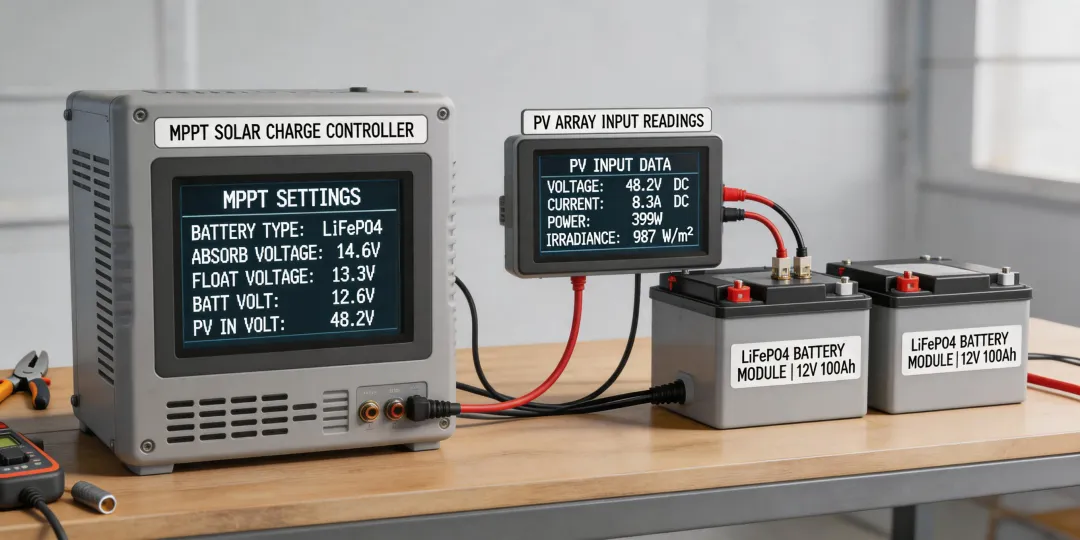
If you've ever tried to set up an EPEVER Tracer with a LiFePO4 battery, you know the default settings are for flooded lead-acid. I still kick myself for not checking this on our first test system. We hooked it up, let it run, and within two days, the battery management system (BMS) on the lithium battery kept cutting off the charge. The battery was hitting 14.6V, which is fine for a full charge, but the controller's default 'overvoltage disconnect' threshold was set way too high for LiFePO4.
The most frustrating part: I knew I should have changed the battery type in the software. But I thought, 'What are the odds? It's a smart controller. It'll figure it out.' Well, the odds caught up with me. The controller wasn't communicating correctly with the BMS. It kept trying to equalize the battery—a process that's necessary for lead-acid but can actually damage lithium cells.
(Should mention: You can program the Tracer series using the MT50 remote meter or the EPEVER solar software. The 'User' battery type setting is your friend. Don't just select 'Lithium' from the dropdown; you have to manually input the absorption voltage, float voltage, and disconnect thresholds. For a standard 4-cell LiFePO4 battery, you want an absorption voltage around 14.4V and a float voltage around 13.8V. But don't quote me on those exact numbers—always check your specific battery datasheet.)
The Hidden Cost of Getting It Wrong
Our first mistake cost us about two weeks of downtime and a heated call with the battery supplier who claimed our controller was 'incompatible.' It wasn't. The settings were just wrong. That delay pushed back the installation of our solar pool heater system (a ground-mounted array we'd already paid a local installer to set up). The pool didn't open on schedule. That made a lot of people unhappy.
So what's the real cost of bad settings? Let's break it down:
- Direct labor: Two electricians spent 4 hours each troubleshooting the charge controller. At $75/hour, that's $600 gone.
- Missed opportunity: The pool heater system could have been generating heat for two weeks. In early spring in our climate, that's roughly $200 in avoided gas costs we didn't get.
- Reputation risk: I looked bad to the VP of Operations. He asked why we couldn't just 'plug it in' like the old system. Explaining the nuances of LiFePO4 charging profiles to a busy exec is not fun.
If I remember correctly, the total wasted cost was around $800. All because I didn't verify the EPEVER Tracer LiFePO4 settings before commissioning the system. A simple 15-minute software configuration would have prevented it.
Can You Add Battery Storage to an Existing Solar System?
This is a question we get a lot now that we have the system up and running. People see our setup and ask, 'Can I add battery storage to my solar system?' The short answer is yes—but with a big caveat.
It's not a plug-and-play upgrade. The standard grid-tied string inverter (like the one we have for our main building) usually can't connect directly to a battery. You need either a hybrid inverter or an AC-coupled solution like the EPEVER (though the Tracer is primarily for DC-coupled off-grid systems).
When we looked into this, we found that adding a separate off-grid system (like the Tracer with batteries) for a critical load panel is often simpler and more cost-effective than retrofitting the main house. We use ours to power the pool pump, a few security cameras, and the network equipment during an outage. It's not a whole-home backup, but it keeps the essentials running.
We found our solar system installers through a local trade association. I'd recommend asking potential installers if they have specific experience with lithium batteries and EPEVER controllers. Not everyone does. Our first installer was great with panels on the roof but had no idea how to configure the Tracer for LiFePO4. We ended up doing the programming ourselves. If that sounds daunting, pay the premium for an installer who specializes in off-grid or backup systems. It's cheaper than the headache.
My Advice to Other Admin Buyers
I could give you a checklist of specs—and I have one now that lives in my notebook—but here's the bottom line: don't trust the model number. The '100A' in the product name doesn't mean it's the right fit. Dig into the actual load and generation numbers. And for the love of all things operational, do not skip the battery type configuration.
Switching from a reactive 'order the biggest thing' approach to a proactive 'verify the settings' approach saved us from a $4,000 misstep. I'm not saying my way is the only way—I still have vendors I prefer to work with even if their pricing is slightly higher because their communication is better. But on technical gear like this, the specs win. Always.
Our accounting team saved about 6 hours of admin work last quarter because the system is now automated and reliable. No more emergency calls about a tripped BMS. That alone, in my book, is worth the time I spent learning the EPEVER Tracer LiFePO4 settings.