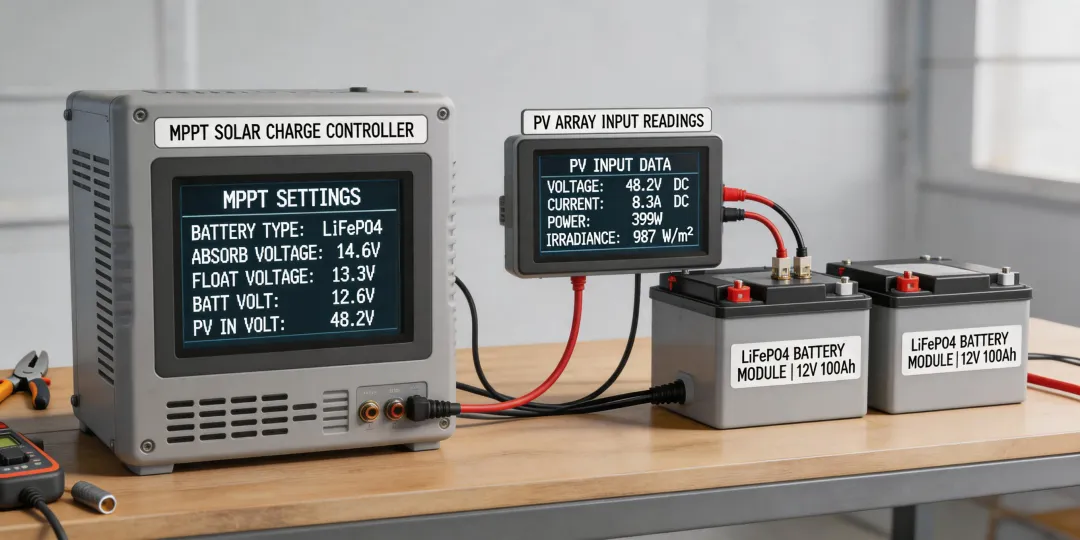
If you're an office manager who’s been handed the keys to a new solar setup—maybe for a remote cabin, a backup system for the server room, or a sustainability project—the first thing you'll hit is the EPEVER charge controller manual. And if you're like me, you don't have time to become a solar engineer. You just need to get it working without blowing a fuse (literally or figuratively).
I manage purchasing for a mid-sized company, and a few years ago, our facilities team installed a small solar array to power our outdoor security cameras and a few remote sensors. My job was to order the components and—since I was the one who read the manual first—configure the controller. It took me three tries and a frustrated call to tech support to get the lithium settings right.
This guide covers the 7 steps I wish I had on day one. It's specifically for setting up an EPEVER charge controller with lithium (LiFePO4) and AGM batteries, which is where most admins get tripped up.
Before You Start: What This Guide Is For
This checklist is for you if:
- You have an EPEVER controller (Tracer, Triron, or Xtract series) and a 20 amp power inverter or similar system.
- You're connecting it to LiFePO4 (lithium) or AGM solar batteries.
- You need the correct voltage settings so the battery isn't undercharged or damaged.
- You don't want to guess at settings based on a confusing manual.
Let's get into it.
Step 1: Identify Your Battery Type (Don't Skip This)
This sounds obvious, but I've seen people wire up a brand-new lithium battery and leave the controller on the default 'Sealed' (AGM) profile. That's a fast track to a trashed battery.
Look at the label on your battery. Is it AGM or LiFePO4? Write it down. If it's a 'lithium-ion' battery, it's almost certainly LiFePO4 (Lithium Iron Phosphate) for solar applications. If it says 'AGM' or 'Gel,' it's a lead-acid type.
Why this matters: The charging voltage is completely different. A LiFePO4 battery needs a lower float voltage and a different absorption profile than an AGM. Using the wrong profile will either undercharge the lithium battery (reducing capacity) or overcharge and damage it.
Pro tip from my own mistake: Take a photo of the battery label. You'll need those voltage numbers later.
Step 2: Set the Battery Type to 'User-Defined'
Your EPEVER controller has preset battery types: Sealed (AGM), Gel, Flooded, and Lithium. Do not use the 'Lithium' preset unless you are 100% sure it matches your specific battery manufacturer's specs. Most LiFePO4 batteries from Renogy, Battle Born, or Dakota have slightly different voltage requirements.
Instead, choose 'User-Defined' (b01). This unlocks the custom voltage settings you'll need for step 3.
(If I remember correctly, this is option 'b01' in the settings menu, accessed by holding the 'Enter' button for 5 seconds.)
Step 3: Input the Correct Lithium Settings (The Critical Step)
This is where most online guides get vague. Here are the specific numbers for a standard 12V LiFePO4 battery using a 20 amp power inverter or similar load. These go in the 'User-Defined' parameters:
- Over-Voltage Disconnect (OVD): 14.6V
- Charging Limit Voltage (CLV): 14.4V
- Equalize Voltage (not used for LiFePO4): 14.4V (set the same as CLV, or disable equalization if possible).
- Boost Voltage (Absorption): 14.4V
- Float Voltage: 13.8V (some prefer 13.6V—check your battery manual)
- Low-Voltage Reconnect (LVR): 12.6V
- Low-Voltage Disconnect (LVD): 12.0V
- Discharge Limit Voltage (DLV): 11.1V
For AGM batteries, the typical settings are:
- Boost Voltage: 14.4V to 14.7V
- Float Voltage: 13.5V to 13.8V
- Equalize Voltage: 14.6V (can be used monthly)
These numbers are industry-standards for 4-cell LiFePO4 as of early 2025. Always verify with your battery's official spec sheet.
Step 4: Check the Load Connection (The Forgotten Step)
Most admins, including my past self, connect the solar panels and battery, then wonder why the 'Load' output isn't working. The EPEVER controller's load output is designed for DC loads only. If you're powering a 20 amp power inverter (which provides AC power), do not connect it to the 'Load' output on the controller.
Connect the inverter directly to the battery terminals (with a fuse). The controller's load output is for small DC items like lights, sensors, or a modem.
I only learned this after my inverter wouldn't turn on and I spent an hour re-reading the manual—though I might be misremembering the exact troubleshooting sequence.
Step 5: Verify with the MT50 Meter or App
If you have the MT50 remote meter (or the EPEView app), use it to confirm your settings. It shows real-time voltage and current. After setting the parameters from Step 3, the display should show the 'Float' or 'Absorption' phase within a few minutes of the sun hitting the panels.
A common mistake here is thinking the battery is charged when the controller shows 'Float' at 13.8V. For lithium, float is just the holding voltage. The battery is only fully charged if it reaches 14.4V during the absorption phase.
Step 6: Tighten Every Connection (Seriously)
This isn't just a safety tip; it's a reliability tip. Loose connections cause heat, voltage drops, and confusing error codes. I once spent two hours diagnosing a 'Battery Over-Voltage' error on a cloudy day. The issue? A slightly loose terminal on the battery side.
- Use a screwdriver to tighten all terminals on the controller (solar +, battery +, battery -).
- Check the battery terminals.
- Check the inverter connections.
A good rule of thumb: If you can wiggle the wire by hand, it's not tight enough.
Step 7: Do the 'Battery Disconnect' Test
This is the final validation step I recommend to any admin. With the solar panels disconnected (or covered), remove the main positive fuse between the battery and the system. Wait 30 seconds, then reconnect it.
If the controller powers on and shows the correct battery voltage without error codes, your wiring and settings are correct. If you get an error, you likely have a reversed polarity, a bad fuse, or the settings didn't save.
Common Mistakes & Final Warnings
Setting up an EPEVER charge controller isn't hard, but it's unforgiving of assumptions. Here are the three biggest mistakes I see (and made):
- Assuming the 'Lithium' preset is perfect: It's a generic profile. Use 'User-Defined' with the numbers from Step 3 for your specific battery (like a Renogy 100Ah LiFePO4).
- Forgetting the temperature sensor: The EPEVER controller usually ships with a small temperature probe. If you don't attach it to the battery, the voltage compensation won't work, especially in cold weather.
- Ignoring the order of connections: The manual says connect the battery first, then solar panels, then loads. This is not a suggestion. Doing it wrong can fry the controller.
The fundamental principles of solar charging haven't changed in 10 years—your battery needs the right voltage at the right time. But the tools for setting that up have gotten much easier (and cheaper). A $150 EPEVER controller with an MT50 meter now gives you the control that used to require a $500 industrial unit. Take the 20 minutes to set it up right, and you'll have a system that runs for years without a second thought.