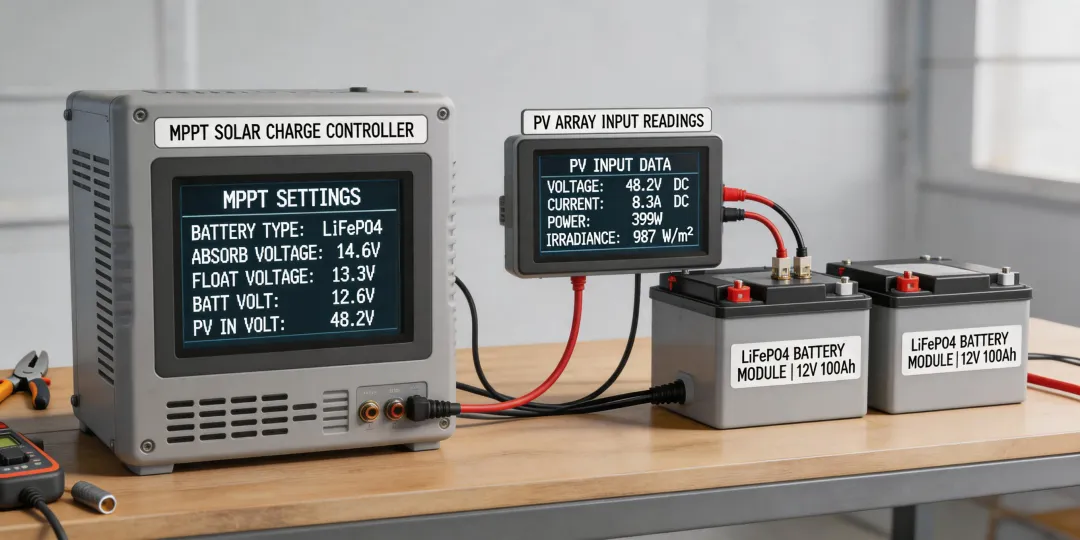
Last June, I stood in a customer's mechanical room holding an Epever Tracer 40A MPPT solar charge controller display in one hand and a printed copy of the manual in the other. The LCD was flashing a fault code. The customer had asked a simple question:
Why does this thing beep every morning?
I didn't have a good answer. That's the moment I realized that quality in a solar install is mostly invisible, and the invisible part is configuration.
I'm the procurement manager at a 14-person solar installation company. I've managed our off-grid equipment budget—about $120,000 per year—for the last six years, and I've documented every order in a cost tracking spreadsheet with way too many tabs. I'm not an electrical engineer. I'm the person who compares datasheets, asks vendors awkward questions about lead times, and then gets blamed when a component doesn't perform the way the spec sheet promised.
We use Epever charge controllers in most of our off-grid projects. Not because they're the cheapest option, but because they offer a user-defined battery profile, which matters when you're pairing a controller with LiFePO4 batteries. The keyword 'LiFePO4 compatible' can mean 'there's a setting for it,' not 'it works out of the box.' I learned that difference the hard way.
How a Fault Code Made Me Read the Epever 40A MPPT Solar Charge Controller Manual
In June, we delivered a small off-grid system for a remote cabin. The controller was an Epever Tracer 40A. The battery bank was a 24V LiFePO4 setup. For the first ten days, everything looked fine on paper. The voltage readings were normal, the loads were small, and the customer was happy.
Then the phone rang. The inverter was shutting down at night. The charge controller was flashing an error in the morning. I assumed it was a bad battery or a wiring issue. I was ready to drive seventy miles and start testing things.
I did what I normally do before a service call: I checked the Epever 40A MPPT solar charge controller manual. I had downloaded it from Epever's website after the install, but I never opened it. Near the battery setting section, there's a table that shows the battery type options: sealed, gel, flooded, and user. The default was gel.
That was the problem.
Our customer's LiFePO4 bank needed a user-defined profile with a higher absorption voltage and a lower float voltage than the gel preset. The gel profile was undercharging the battery. Every night, the voltage dropped just far enough to trip the inverter's low voltage cutoff. Every morning, the charge controller woke up and tried to correct it. Neither the controller nor the inverter was broken. They were just speaking different battery languages.
The fix took about fifteen minutes after I found the right menu. I changed the battery type to USER. Then I set the absorption voltage to 28.8V, float voltage to 27.6V, equalization to disabled, and temperature compensation coefficient to 0 mV/°C for the LiFePO4 bank. That was it.
The Epever Tracer LiFePO4 Settings That Fixed the System
If you're searching for Epever Tracer LiFePO4 settings, here's what I can tell you from a procurement perspective, not from an engineering degree. The Tracer series doesn't always have a one-button LFP preset. On the Tracer AN models we use, the battery type menu includes USER for a reason. That's the setting for lithium iron phosphate.
- Battery type: USER (not sealed or gel)
- Absorption voltage: 28.8V for a 24V LiFePO4 bank (check your battery manual)
- Float voltage: 27.6V for a 24V LiFePO4 bank (check your battery manual)
- Equalization: disabled
- Temperature compensation coefficient: 0 mV/°C (lithium doesn't like the lead-acid temperature correction)
Please do not copy those numbers without checking your own battery datasheet. The settings are for our system. The principle, though, is universal: the controller is not the boss of the battery. The battery's own specifications are the boss. The controller just needs to be told what those specifications are.
I only believed this after ignoring it and causing a callback. I had read 'LiFePO4 compatible' on the marketing page and assumed the controller would know what to do. It doesn't. It follows a profile. If the profile is wrong, the battery works against the controller instead of with it.
The first resource should be the Epever 40A MPPT solar charge controller manual. It's a PDF, it's on Epever's official site, and it has a fault code table that explains most of the errors you'll ever see. I now keep a printed copy in the truck. It has coffee stains on it. It has saved us more than one Saturday.
Why the 'Cheap' Fix Is Never the Real Cost
The same week we fixed the cabin system, we had ordered a Siemens Level 2 charger rental for a customer's workplace EV charging demo. The rental arrived with no setup card. I called the company and asked if they had any instructions. Their reply was, 'It's in the manual.' I hated hearing that because I was guilty of doing the exact same thing with the Epever controller.
But that's the thing about quality. The customer doesn't see the battery profile. The customer sees an inverter that beeps every morning. The customer sees a business card that prints fine before lunch and smudges after lunch. The customer sees a system that stops working three days after the installer leaves. Those small failures create a perception of the entire company.
One of our best sources of new work is people searching 'solar panel installation company near me.' I know because our sales team asks every new customer how they found us. The companies that win those searches are not always the ones with the lowest price. They are the ones with the least drama. The customer at the cabin is going to tell the neighbors that the system works, but the reason it works is a setting in the USER menu of an Epever controller.
I've also reached a point where I don't cringe as much when someone reaches our website by searching 'how to see solar system snapchat.' That query is not about solar panels at all. It's about Snapchat's Solar System feature, which ranks your friends by closeness. It used to feel like wasted traffic. Now it reminds me that words like 'solar system' mean different things to different people. When a customer asks about 'lithium settings,' they might mean a battery, a charger, or something else entirely. The only way to know is to ask, or to read the manual.
It took me six years and roughly 130 site visits to understand that the manual is not paperwork. It's the maintenance contract. The red flag in the cabin system was that everything looked fine on paper. The real risk wasn't the controller; it was my assumption that 'compatible' meant 'configured.' I calculated the worst case before the fix: another seventy-mile round trip and a customer who would tell everyone not to use us. The best case was a few minutes in a menu. The expected value of reading the manual was obvious. I just needed to stop blaming the hardware.
Bottom line: the Epever Tracer LiFePO4 settings are not a secret. They're in the Epever 40A MPPT solar charge controller manual. The surprise is that so many installers skip them. I did. It cost me a Saturday, a service truck, and part of my confidence in front of a customer.
Per FTC's Green Guides (ftc.gov), if we advertise a controller as 'lithium-compatible,' we have to be able to substantiate that claim. A spec sheet that says 'LiFePO4' is not enough. The substantiation is the manual's battery type table and the user profile that actually matches the battery. That's the difference between marketing and quality.
Now I treat every manual as part of the procurement process. The product price is only a small part of the total cost. The hidden cost is the callback when no one reads the manual. I'd rather spend fifteen minutes changing a battery profile than spend six hours explaining why the system beeps. After our Saturday at that cabin, reading the manual before commissioning is a no-brainer.