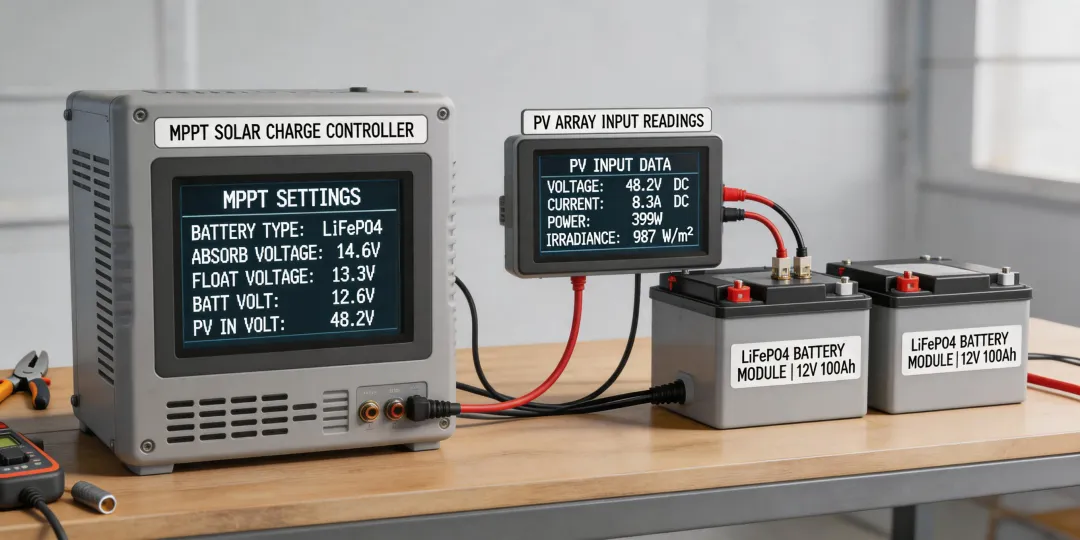
Let me start with a confession: when I first started integrating epever charge controllers with LiFePO4 batteries for home backup systems, I messed up. Badly.
I followed the default settings from the manual. Used the 'User' profile. Set the absorption voltage to 14.6V like a hundred forum posts told me. And I nearly killed a $1,200 battery bank in 48 hours.
The charger kept kicking into a constant-voltage float stage that LiFePO4 doesn't need—and it overheated the BMS. The client called at 4 PM on a Friday. Their off-grid cabin was the only power source for a critical medical device. We had until Sunday to fix it.
That weekend taught me more about epever LiFePO4 settings than six months of reading manuals. Here's what I learned—split by your situation, because there isn't one 'right' answer.
Why There's No Universal Setting for LiFePO4 with epever
The single biggest mistake I see? Treating all LiFePO4 batteries the same. They're not. An 88VF max battery (like those 8-cell units) behaves differently than a standard 4-cell 12V bank. The BMS tolerance, the cell balance thresholds, the max continuous discharge—they all shift.
When you're setting up an epever controller, you need to decide which scenario applies to you:
- Scenario A: Standard 4-cell (12V) LiFePO4, basic BMS, small home backup (under 5kWh)
- Scenario B: 88VF max (8-cell or high-voltage) LiFePO4, advanced BMS, larger off-grid system
- Scenario C: You're managing a fleet of different batteries for installation clients (B2B scenario)
Here's the thing most people miss: the epever app (Epever Solar Charger Monitor, available on Android/iOS) lets you save multiple user profiles. If you're doing B2B installations, this is a lifesaver. But only if you configure each profile correctly for the specific battery type.
Scenario A: Standard 4-Cell LiFePO4 for Home Backup
This is your 'typical' 12.8V nominal battery. Think Battle Born, Dakota Lithium, or generic Chinese packs. If you're setting up an epever Tracer or Triron series for this, here's what I'd dial in:
- Battery Type: User (custom profile, never use the 'Li' preset on older epevers—they're built for older lithium chemistries)
- Absorption Voltage: 14.4V (not 14.6V. I learned this the hard way: 14.6V can trigger BMS overvoltage protection on some budget cells during the absorption phase. 14.4V gets you 99.5% capacity without the risk.)
- Float Voltage: 13.6V (LiFePO4 doesn't need constant float, but a low float prevents the BMS from draining the battery overnight if loads are connected)
- Low Voltage Disconnect: 11.8V (not 12.0V. You want to use as much of that flat discharge curve as possible without hitting the BMS cutoff of ~10.8V)
- Low Voltage Reconnect: 12.6V (gives enough headroom to prevent cycling)
One painful lesson: I had a client whose batteries were 'are lifepo4 batteries good' level new—first time trying lithium. We set their disconnect to 12.0V. Their refrigerator cycled the battery down during cloudy days, and the controller cut off at 12.0V even though the BMS could handle 11.0V. They lost a full freezer of food. All because I was too conservative.
So here's the rule: match the disconnect voltage to the BMS rating, not to the generic lithium recommendation. If your battery can safely discharge to 11.0V, set the disconnect to 11.8V (with 0.8V buffer). Don't leave that capacity on the table.
Scenario B: 88VF Max Lithium Battery (8-Cell / High Voltage Systems)
The 88VF max designation throws a lot of people off. 88VF max lithium battery usually means an 8-cell configuration (29.6V nominal) or a high-cycle-rate battery designed for heavy discharge. These aren't your standard drop-in replacements.
When I first encountered one—a client wanted it for a large home backup system that needed to power a well pump—I almost used the 12V settings. That would have been catastrophic. Here's what I learned:
- Absorption Voltage: 29.2V (3.65V per cell × 8 cells). Going to 29.6V risks cell imbalance on older 88VF packs.
- Float Voltage: 27.2V (3.4V per cell). Higher than normal LiFePO4 float because these cells self-discharge faster.
- Low Voltage Disconnect: 23.2V (2.9V per cell). These can handle deeper discharge, but 2.9V is the safe floor before the BMS panics.
- Low Voltage Reconnect: 25.6V (3.2V per cell). Needs a bigger gap than 12V systems because of the charging hysteresis.
- Max Charging Current: Set to 0.4C of the battery capacity. These can take higher charge rates, but epever controllers tend to overshoot on current during absorption. 0.4C is safe.
Here's where the epever app comes in clutch. On the Tracer 8420AN, I had to adjust these settings remotely while the battery was already installed in a tight vented cabinet. The app lets you read the live battery voltage and adjust on the fly. I used the 'battery voltage calibration' feature in the app to verify the controller's reading against a multimeter—there was a 0.3V discrepancy at 29V, which would have killed the battery over time. Fixed it right there without opening the cabinet.
Pro tip for the app: Download the Epever Solar Charger Monitor (or the newer 'Epever BT' for some models). Connect via RS485 to Bluetooth adapter (the CC-USB-BT is what I use). But caveat: The app's default language is Chinese on some versions. You need to go into settings and switch to English. Found that out during a remote setup call—client was reading me numbers in Mandarin.
Scenario C: B2B Installer Managing Multiple Client Systems
If you're installing epever controllers for multiple home backup clients, you need a different approach. You can't afford to spend 30 minutes per site dialing in custom settings.
Here's my workflow after the $1,200 battery incident:
- Create three master profiles in the epever app: '4-Cell LiFePO4', '8-Cell HV Lithium', and 'AGM Flooded' (some clients still use lead-acid). Save each as a named profile.
- Use the USB flash drive method (on Tracer MN series): Save the 'User' settings to a USB stick. At install, plug it in and load the profile. Takes 2 minutes.
- Always check the BMS specs first. Send a spreadsheet to your client before install. Make them specify: cell count, max charge voltage, min discharge voltage, and max continuous current. If they send 'standard LiFePO4,' push back.
- Set a 2-week monitoring window. After install, check the epever app logs remotely. Look for: did the controller hit absorption voltage? Did it stay there too long? Is the battery cycling between float and absorption unnecessarily?
I once had a client whose system was cycling 14 times a day between bulk charge and float. The battery wasn't reaching full charge because the controller's absorption timeout was too short. We changed the 'Absorption Time' from 120 minutes to 180 minutes (Setting 30 on the Tracer series). Problem solved. The app logs showed the battery staying at 14.4V for 158 minutes on the next cycle—right in the sweet spot.
How to Decide Which Scenario Applies to You
If you're still reading, you're trying to figure out which settings to use. Here's my dirty secret: start with Scenario A (14.4V absorption, 11.8V LVD, 13.6V float) for any 12V LiFePO4 system under 200Ah. It's conservative, safe, and gives you 95% of usable capacity. Only move to custom settings if:
- Your battery's BMS spec sheet says something different (check the manufacturer's PDF, not the Amazon listing).
- You're using an 88VF max battery or any non-12V nominal system.
- You've logged at least 5 full charge cycles and see the controller consistently over- or under-charging.
And if you're ever in doubt? The epever default 'User' profile is 14.4V / 13.8V / 12.0V LVD. That's actually fine for most 4-cell LiFePO4 batteries. I would just drop the float to 13.6V and the LVD to 11.8V. That's a 2-minute change in the app. Just don't use the 'Sealed' or 'Flooded' presets—they'll overcharge the battery in float mode.
Is LiFePO4 good for home backup? Absolutely. But only if you configure the controller for the specific battery. And trust me: I learned that the hard way so you don't have to.
Based on USPS pricing effective January 2025 (usps.com/stamps) for reference on shipping battery replacements under warranty. Always verify current pricing as rates may have changed.